

News from 21 October 2026, added to the archive on 22 October.
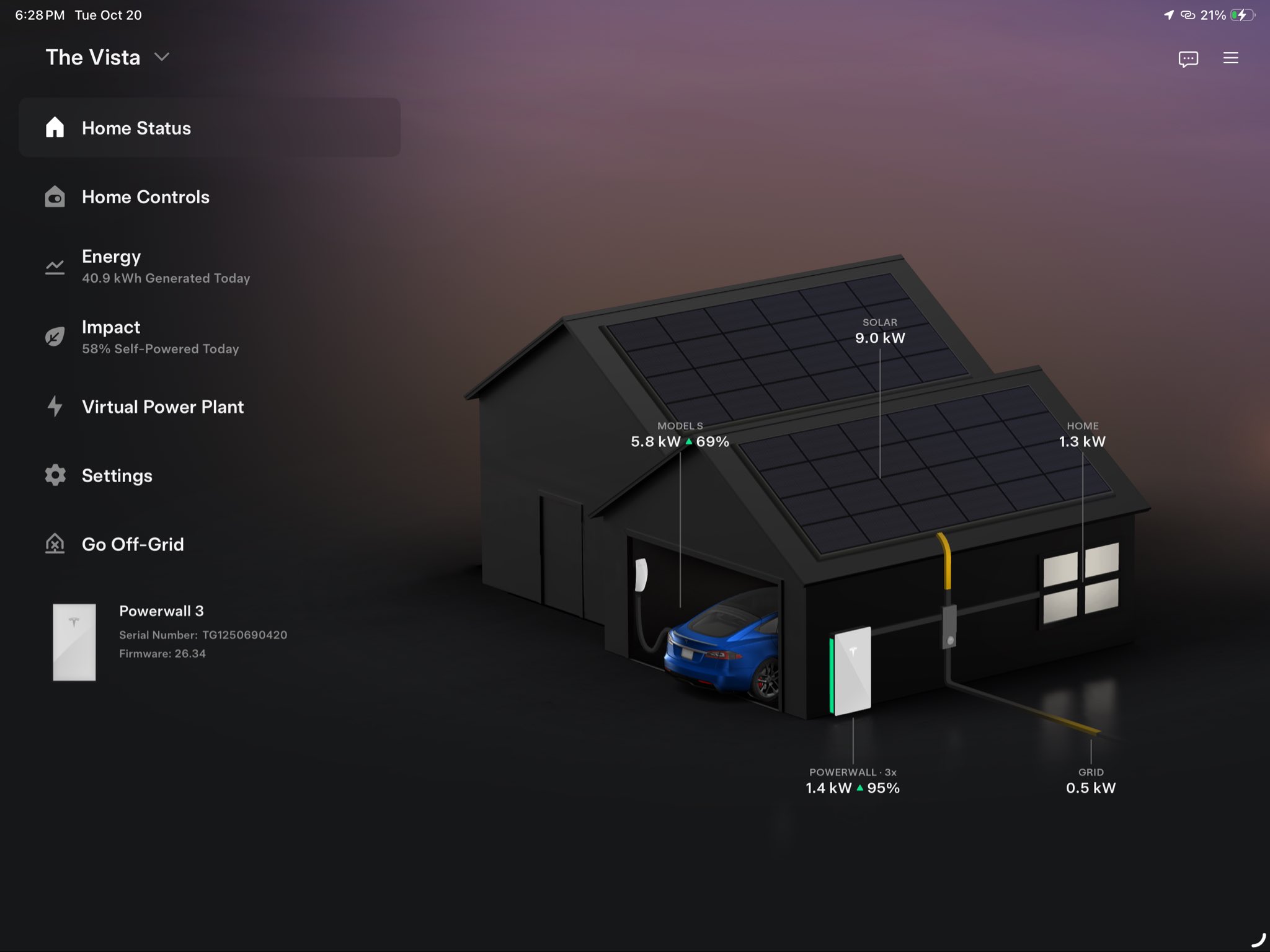
The Tesla app is getting a dedicated interface for iPad, Android tablets and foldable devices. The release was announced on 21 October by Alex Guichet from Tesla’s interface team. The change concerns how information and controls use larger screens: it does not mean every feature shown in the images is available on all cars or in every country.
For people who often check charging and climate control from home, the most interesting change is being able to see more information at once. A tablet becomes easier to use, without having to navigate a screen designed only for a phone.
Tesla app on iPad: three changes to know about
- Menus and content side by side. In the screenshots shared by Guichet, navigation sits on the left, while the main view and details use the remaining space.
- A larger car on screen. The vehicle visualisation and quick controls have more room; the image also shows options to customise controls and display tyre pressures.
- A broader view of energy, too. The home screen brings together the house, solar panels, Powerwall and energy flows in a layout suited to a tablet.
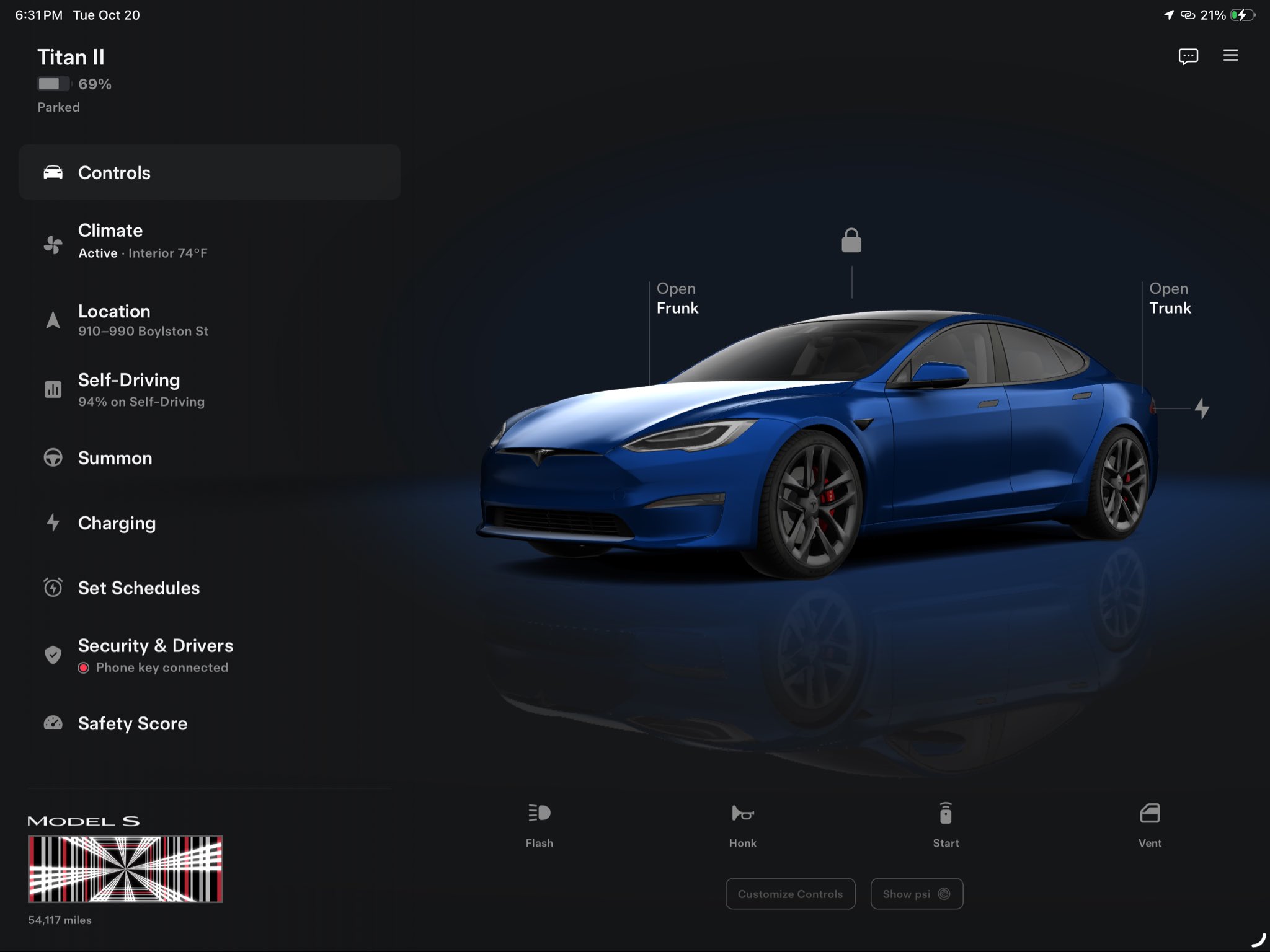
These images illustrate the interface, rather than a list of features available to buy in Italy. A label such as Self-Driving or Summon does not, on its own, establish that the feature is enabled on the reader’s vehicle.
Gradual rollout: why you may not see it straight away
Guichet said distribution would be slow and could take another week or two to reach everyone. The team intends to check behaviour across different screens and continue refining the experience in subsequent releases.
The first thing to avoid is confusing “announced” with “already on my device”. Not receiving the update immediately is not enough to diagnose an account or vehicle problem.
How to check your Tesla app
Tesla’s support page recommends using the official app and keeping it updated through the App Store or Google Play. To check the installed version, open the menu at the top right and scroll to the bottom: the version number is shown there.
The app provides access to vehicles and energy products associated with your account. For vehicle features, Tesla says the car must have been delivered and mobile access enabled. Energy products require the system to be installed and powered. The new visual design does not, by itself, change those requirements.
If the vehicle is missing, first check which account you are using and whether mobile access is enabled on the touchscreen. Avoid reinstalling the app simply to speed up rollout: Tesla notes that reinstalling requires pairing Phone Key again where the vehicle uses it.
Updating the app is different from updating the car
It helps to distinguish the two processes. The app updates through the device’s store; vehicle software follows Tesla’s update system, with distribution by configuration and geographical area. A new interface appearing on the tablet does not establish that the same update has arrived on the car’s touchscreen.
For vehicle software, the reference remains Controls > Software and the associated release notes. Tesla requires the vehicle to be parked during installation, and you cannot drive while it is underway. This is different from simply updating the mobile app.
Follow other developments in the Tesla ecosystem in Teslhub’s Software updates section.
References: Alex Guichet’s announcement and images, his rollout clarification, official Tesla app support and vehicle software updates. Archive cover from the Teslhub library; internal screenshots are originals from the announcement thread.
Stay up to date with Teslhub
Follow the news on our Telegram channel and WhatsApp channel. For questions and experiences, join us on Teslhub Members.
See you in the next update!
Alessandro Marmaglio
Founder of Teslhub


Let’s discuss it
Experiences, questions and perspectives from the Teslhub community.
Please keep the discussion respectful. Members’ comments are moderated before publication.
Start the conversation. Leave the first comment.