
Buying a Tesla can be completed online, from choosing a car to managing the order. The original Italian guide also described a €1,000 referral discount available during its offer period. That amount was a historical promotion, not a guarantee of a benefit available today. Check the terms displayed by Tesla before ordering.
This guide explains the stages described in the original article, from selecting a model to confirming an order and completing the tasks before delivery. Screens, fees and available options can change.
Step 1: Open the referral link and choose a model

The original guide instructed buyers to open the following referral link before configuring the vehicle. Its quoted €1,000 discount belonged to the offer period discussed in that article:
https://www.Teslhub.com/Sconto
The link takes you to Tesla’s website, where you choose the model you want to order and continue through the normal purchase process. Confirm any applicable benefit in the order details rather than assuming the historical discount still applies.
Step 2: Configure your Tesla

After selecting a model, use the online configurator to personalise the car. Depending on the version and market, choices can include paint colour, wheels and interior trim. The original guide also discussed driver-assistance packages such as Enhanced Autopilot and Full Self-Driving. Availability varies, and purchasing a package does not mean that every advertised future function is approved or enabled locally.
Step 3: Choose how to pay

Continuing from the configuration page takes you to an order summary showing the selected vehicle, costs and available payment choices. The original guide described the following categories; the current configurator and agreement determine which are offered and on what terms:
- Cash: paying the full price, with the balance subsequently settled by bank transfer using the instructions provided through Tesla’s official order process.
- Leasing: a contractual payment arrangement whose duration, ownership and any end-of-term purchase option depend on the specific agreement.
- Rental: using the car for an agreed period under the rental provider’s conditions.
- Balloon-payment finance: monthly repayments followed by a larger final payment, with all amounts and end-of-term options set out in the finance agreement.
Step 4: Complete the order

The original ordering flow asked buyers to select Order with Card and pay a €250 initial order payment. That is the historical amount quoted by this guide, rather than a statement of the current fee or its refundability. Check the amount and conditions shown at checkout.
After entering the required details, the guide instructed buyers to choose Order and Pay and follow the next steps. Any referral benefit should be checked in the applicable order information:
- Order confirmation: after payment, Tesla sends an email containing the order details.
- Tesla account: create an account if you do not already have one.
- Personal details: provide the information requested by Tesla, such as your name, email address and a secure password.
- Email verification: follow the verification instructions sent to your email address, where required.
Further messages and the assigned Tesla contact help guide the buyer through the remaining stages. The timing and level of assistance depend on the order and delivery process.
Step 5: The Tesla app and final tasks
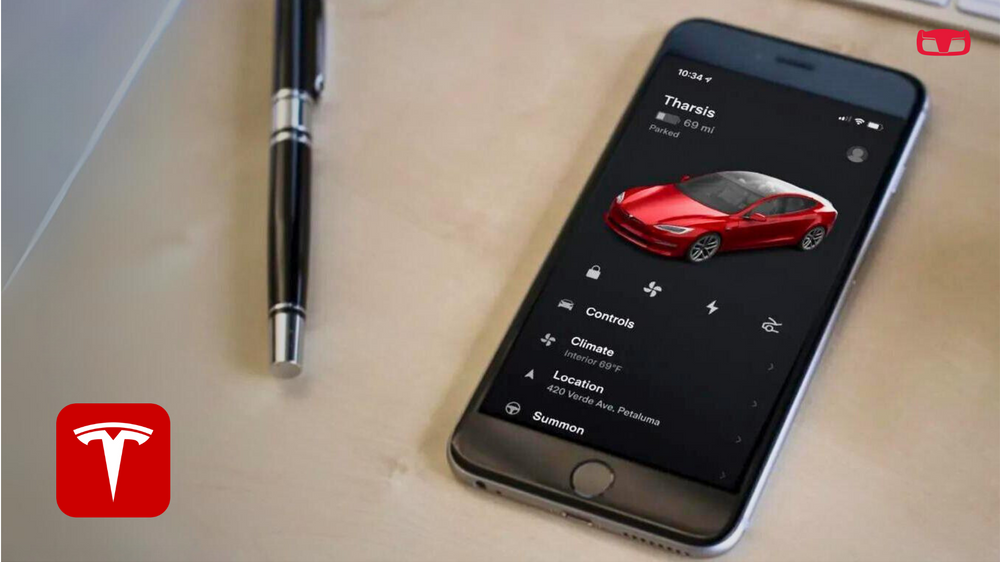
Install the Tesla app on your smartphone to manage the order and complete the tasks made available for your purchase:
Order progress: check the status of the order and receive updates.
Vehicle functions: after delivery and account activation, the app provides access to supported remote functions such as locking and climate control.
The app displays the vehicle associated with your order.
Your Tesla order is under way
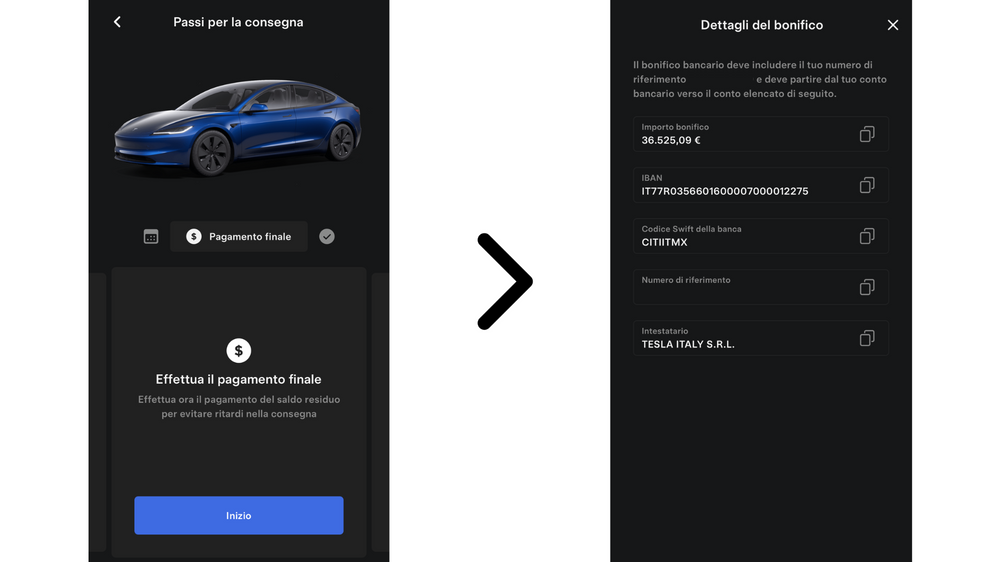
Opening the order brings up the delivery tasks. The original guide grouped them into four main areas:
♦️ Delivery location: review the collection location shown for your order. Tesla may contact you about available alternatives or specific delivery requirements.
♦️ Trade-in: indicate whether you have a vehicle to trade in and provide the requested details for a valuation. You can review the offer and choose whether to proceed. Trading in a vehicle and scrapping it are different arrangements.
♦️ Payment method: select one of the options available for the order. The original guide discussed cash, leasing, rental and balloon-payment finance.
– For a cash purchase, the balance is the final amount due after payments already credited. Use the beneficiary details shown through Tesla’s official order channel and check the payment instructions carefully.
– For an available finance arrangement, the relevant provider’s process lets you review matters such as the deposit, term and monthly payment. The full agreement, including the final payment and total cost, determines the obligations.
♦️ Registration: provide the information required to register the vehicle and prepare it for delivery.
Work through each section carefully and check the details before confirming them. The app and the official order communications should be used for the requirements that apply to your own purchase.
Best wishes to everyone choosing a Tesla!
Teslhub is also on Telegram and WhatsApp!
Follow our channels to keep up with the latest news.
Join Teslhub Members, our Telegram community, to talk, ask questions and share Tesla experiences with us and other members.
We hope you enjoyed the article. See you in the next one, or on our social channels.
See you soon!
Giorgio Rebecchi
Editor



Let’s discuss it
Experiences, questions and perspectives from the Teslhub community.
Please keep the discussion respectful. Members’ comments are moderated before publication.
Start the conversation. Leave the first comment.