
With software version 2025.32, Tesla introduced Low Power Mode, designed to reduce energy use while parked. It addresses the much-discussed issue of “phantom drain”: losing range even when the car is stationary. A vehicle that appears switched off can still have several features running and drawing power.
How to activate Low Power Mode
Tesla provided two ways to use the feature:
- Manual activation: from the car’s menu (Controls > Charging > Low Power Mode) or the Tesla app (Controls > Low Power Mode, or by adding a shortcut).
- Automatic activation: set a battery threshold, with 20% as the default described in the release, below which the mode turns on automatically to preserve energy.
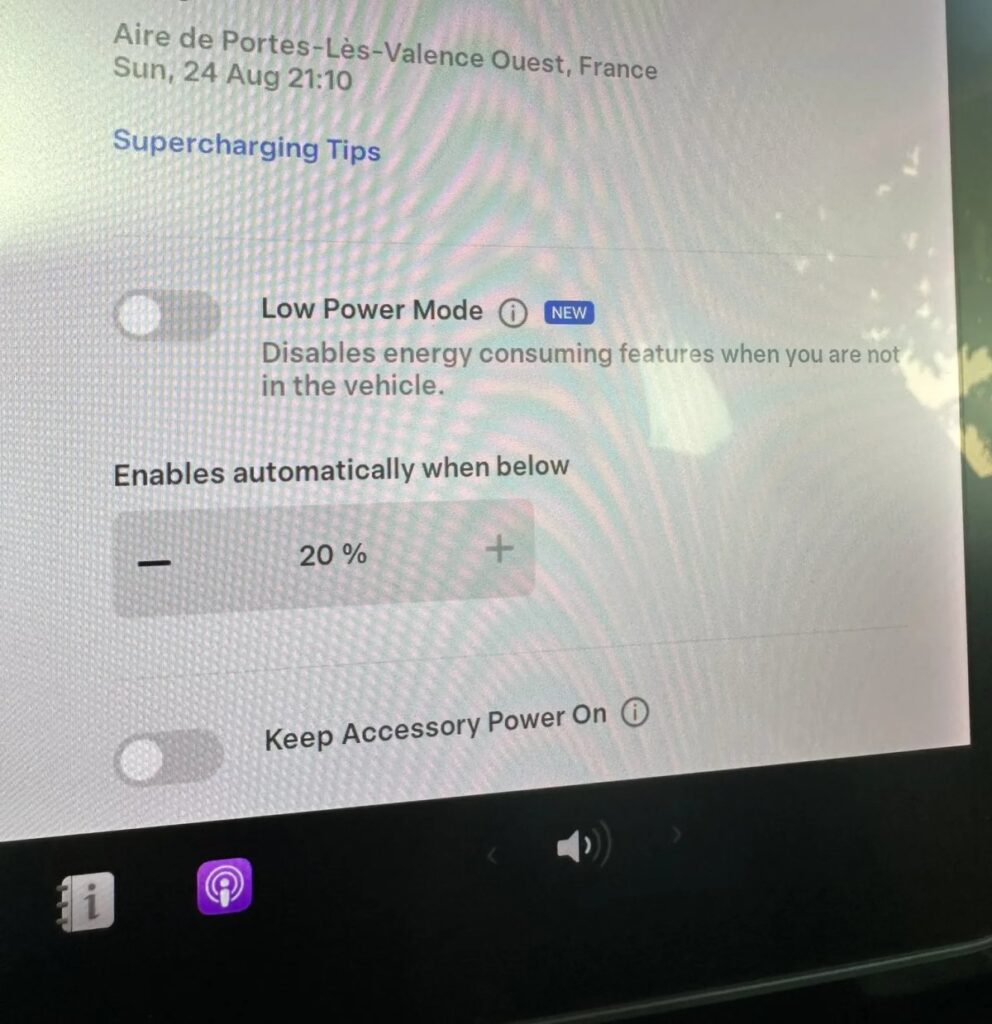
That flexibility makes it useful for both ordinary parking and longer periods away, such as an airport stay or a holiday, when features might otherwise remain active unnoticed.
What does Low Power Mode switch off?
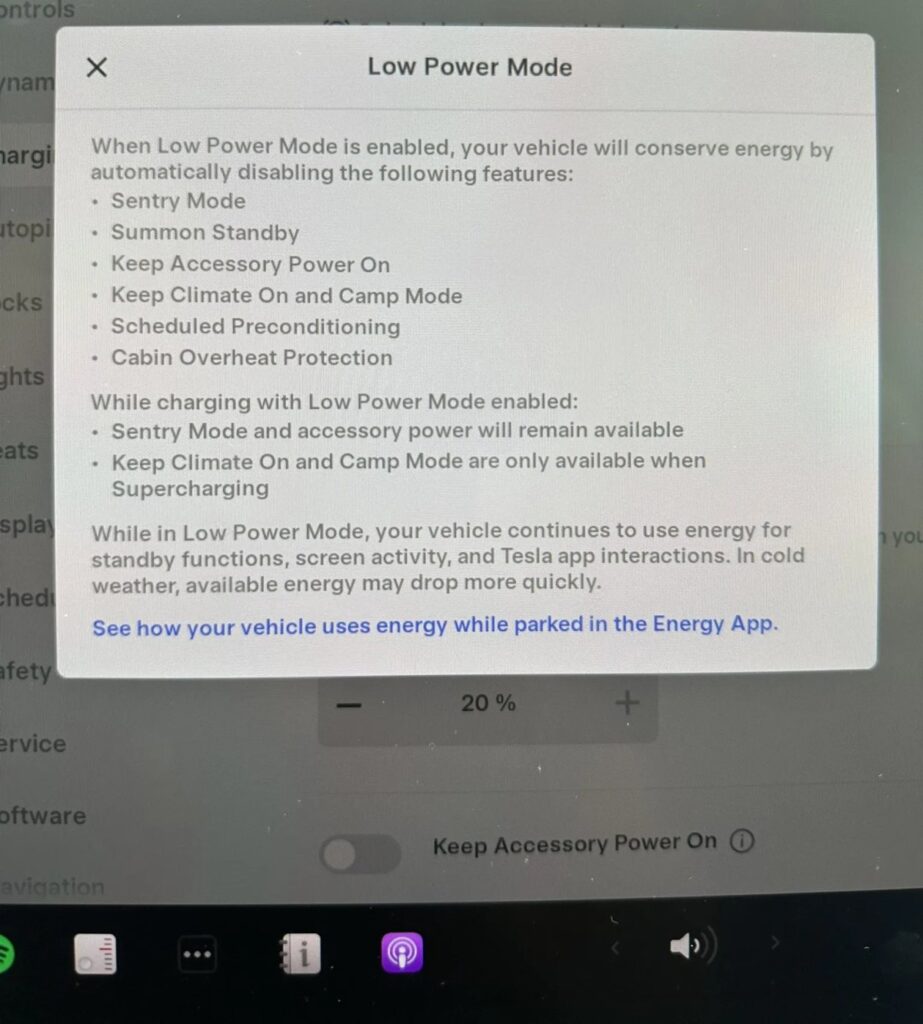
To save energy, Low Power Mode disables several features that can use power while the car is parked, including:
- Sentry Mode
- Summon Standby
- Cabin Overheat Protection
- Scheduled preconditioning
- Climate control
- Camp Mode
- Power outlets, where fitted
- Keep Accessory Power On
- Remote seat and steering wheel heating
- Defrosting and de-icing
The article estimated that these features could together account for up to 40 km of range a day, depending on conditions and use. Switching them off together makes parked-energy management simpler; actual savings vary.
Low Power Mode does not turn the car off completely. It remains connected and accessible through the app, using a small amount of energy for basic functions and battery temperature management.
Exceptions and overrides
The archived report also described the following exceptions. They should not be assumed to apply to every model or current software version:
- Sentry Mode and accessory power remain available while charging, according to the release description.
- Climate control and Camp Mode remain active while Supercharging.
- The original report treated Dog Mode as an exception, but this must not be read as a guarantee at low charge. Tesla’s owner’s manual warns that Dog Mode climate control can stop below 20% battery charge or if the climate system detects a problem. Follow the vehicle’s actual alerts and actively monitor your pet and the cabin temperature.
Tesla also included confirmation prompts: manually turning a restricted feature back on brings up a warning about additional energy use, while leaving the decision to the owner.
A welcome energy-management tool
Low Power Mode gives owners a practical way to limit parked consumption and more control over energy use. It is particularly useful when leaving the vehicle stationary for an extended period, such as while travelling.
💶 REFERRAL PROGRAMME 🚘
The €500 discount offer described at publication
Click the following link to apply the discount and order the car through the normal purchase process (or copy and paste it into Google):
https://www.Teslhub.com/Sconto
👏 That’s it! Under the offer described at publication, this provided €500 off a new Tesla.
The discount link was also listed in our bio under “Buy a Tesla – €500 discount” and in our website menu under “Buy a Tesla”.
🌐 STAY UP TO DATE 📢
If you do not want to miss any news, these are great places to stay up to date.
Join Teslhub Members: a whole community on Telegram to talk, ask questions and share Tesla experiences with us and other members. Find us on WhatsApp too!
Enjoy the rest of your day. See you in the next article or on our social channels.
Until next time!
Giorgio Rebecchi
Editor




Let’s discuss it
Experiences, questions and perspectives from the Teslhub community.
Please keep the discussion respectful. Members’ comments are moderated before publication.
Start the conversation. Leave the first comment.